MS Windows
Aos command-line tools support next Microsoft operating systems:
- Windows 10
- Windows 11
1. Install python
Even if you've already installed Python from the Microsoft Store, or don't know the source of the Python installation, you're recommended to install Python from the official website. This prevents possible errors during Python package installation and issues related to the environment variables.
Download the latest Python from the official website and install it.
2. Choose important options
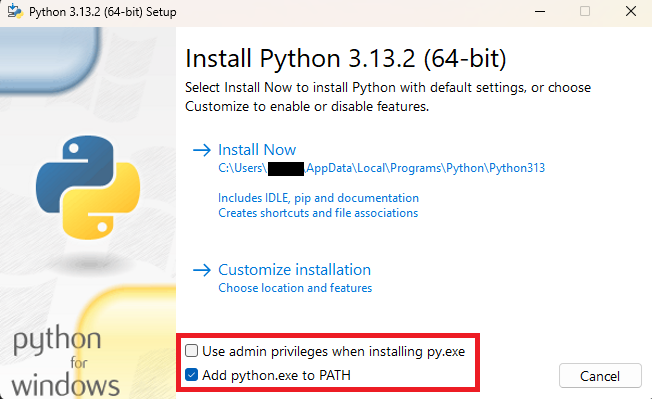
Important! During the installation process, check the "Add python.exe to PATH" checkbox on the option screen, as shown on the screenshot below.
3. Proceed with the installation
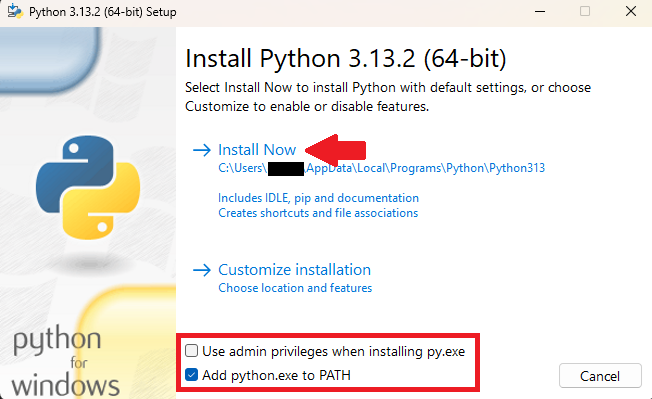
Press the Install Now link to start the installation process.
4. Open the terminal window
All next steps are executed in a terminal window. Read how to open it here.
5. Prepare python environment
1. Create the python virtual environment
In the terminal window, run the next command and wait until the command is finished:
python -m venv "$env:USERPROFILE/.aos/venv"
Example output
PS C:\Users\User> python -m venv "$env:USERPROFILE/.aos/venv"
PS C:\Users\User>
2. Verify environment
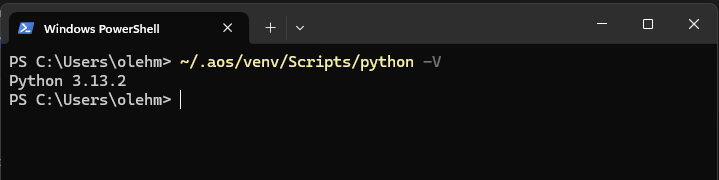
To verify installation, open a terminal window and run the command to check the Python version 3.9 or later:
~/.aos/venv/Scripts/python -V
6. Install Aos command-line tools
In the terminal window, execute the next command:
~/.aos/venv/Scripts/python -m pip install --upgrade aos-keys aos-signer aos-prov
Example output
PS C:\Users\User> ~/.aos/venv/Scripts/python -m pip install --upgrade aos-keys aos-signer aos-prov PS C:\Users\User> python -m venv "$env:USERPROFILE/.aos/venv" Collecting aos-keys Collecting aos-signer Collecting aos-prov
....
Installing collected packages: asn1crypto, urllib3, types-python-dateutil, six, semver, ruamel.yaml, rpds-py, PyJWT, pygments, pycparser, protobuf, mdurl, idna, grpcio, charset-normalizer, chardet, certifi, attrs, requests, referencing, python-dateutil, markdown-it-py, cffi, rich, jsonschema-specifications, cryptography, arrow, jsonschema, isoduration, aos-keys, aos-signer, aos-prov Successfully installed PyJWT-2.10.1 aos-keys-1.8.0 aos-prov-5.1.0 aos-signer-1.16.0 arrow-1.3.0 asn1crypto-1.5.1 attrs-25.3.0 certifi-2025.1.31 cffi-1.17.1 chardet-5.2.0 charset-normalizer-3.4.1 cryptography-42.0.4 grpcio-1.71.0 idna-3.10 isoduration-20.11.0 jsonschema-4.23.0 jsonschema-specifications-2024.10.1 markdown-it-py-3.0.0 mdurl-0.1.2 protobuf-3.20.1 pycparser-2.22 pygments-2.19.1 python-dateutil-2.9.0.post0 referencing-0.36.2 requests-2.32.3 rich-13.9.4 rpds-py-0.23.1 ruamel.yaml-0.18.10 semver-3.0.4 six-1.17.0 types-python-dateutil-2.9.0.20241206 urllib3-2.3.0
[notice] A new release of pip is available: 24.3.1 -> 25.0.1 [notice] To update, run: C:\Users\User\.aos\venv\Scripts\python.exe -m pip install --upgrade pip PS C:\Users\User>
7. Install Aos root certificates as trusted
In the terminal window, execute the next command:
~/.aos/venv/Scripts/python -m aos_keys install-root
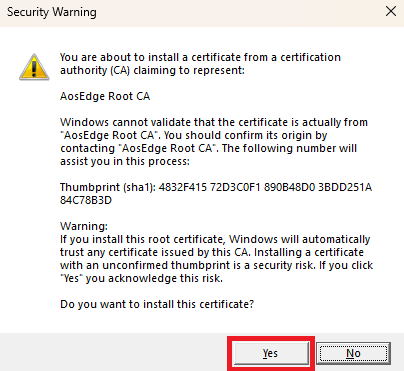
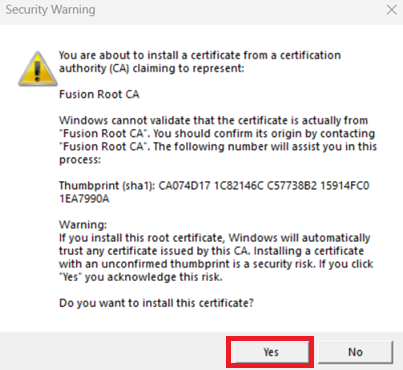
MS Windows may ask you to confirm the installation of the root certificates, if they aren't present in the system:
Press "Yes" to allow the installation, as shown in the screenshots below.
Example output
PS C:\Users\User> ~/.aos/venv/Scripts/python -m aos_keys install-root Root "Trusted Root Certification Authorities" Signature matches Public Key Related Certificates:
Exact match: Element 0: Serial Number: fc24d8d15f4833e3 Issuer: C=UA, L=Kyiv, OU=Novus Ordo Seclorum, O=EPAM, E=xyz at epam.com, CN=Fusion Root CA NotBefore: 10-Apr-18 13:33 NotAfter: 27-Jun-26 13:33 Subject: C=UA, L=Kyiv, OU=Novus Ordo Seclorum, O=EPAM, E=xyz at epam.com, CN=Fusion Root CA Signature matches Public Key Root Certificate: Subject matches Issuer Cert Hash(sha1): ca074d171c82146cc57738b215914fc01ea7990a
Certificate "Fusion Root CA" already in store. CertUtil: -addstore command completed successfully. Root "Trusted Root Certification Authorities" Signature matches Public Key Related Certificates:
Exact match: Element 1: Serial Number: 262248a2965ea9747f4b2f92dfc1c233847e200e Issuer: CN=AosEdge Root CA, OU=Aos, O=EPAM Inc NotBefore: 26-Dec-24 14:01 NotAfter: 21-Dec-44 14:01 Subject: CN=AosEdge Root CA, OU=Aos, O=EPAM Inc Signature matches Public Key Root Certificate: Subject matches Issuer Cert Hash(sha1): 4832f41572d3c0f1890b48d03bdd251a84c78b3d
Certificate "AosEdge Root CA" already in store. CertUtil: -addstore command completed successfully. PS C:\Users\User>