macOS
Supported operating systems
- macOS Ventura 13
- macOS Sonoma 14
- macOS Sequoia 15
Other OS versions might work but haven't been tested.
1. Install python
Even if you've already installed Python from the Apple repository, or don't know the source of the Python installation, you're recommended to install Python from the official website. This prevents possible errors during Python package installation and issues related to the environment variables.
Download the latest Python from the official website and install it.
2. Open a terminal window
All next steps are executed in a terminal window. Read how to open it here.
3. Python virtual environment preparation
1. Create the python virtual environment
In the terminal window, run next command and wait until it's finished:
python3 -m venv ~/.aos/venv
Example output
→ ~ python3 -m venv ~/.aos/venv
→ ~
2. Verify environment
To verify installation, in the terminal window, run the command to check the python version that should be 3.9 or later:
~/.aos/venv/bin/python3 -V

4. Install Aos command-line tools
Execute next command in the terminal window:
~/.aos/venv/bin/python3 -m pip install --upgrade aos-keys aos-signer aos-prov
Example output
→ ~ ~/.aos/venv/bin/python3 -m pip install --upgrade aos-keys aos-signer aos-prov Collecting aos-keys Downloading aos_keys-1.8.0-py3-none-any.whl.metadata (2.8 kB) Collecting aos-signer Downloading aos_signer-1.15.3-py3-none-any.whl.metadata (1.1 kB) Collecting aos-prov Downloading aos_prov-5.0.2-py3-none-any.whl.metadata (2.5 kB)
...
Installing collected packages: asn1crypto, urllib3, types-python-dateutil, six, semver, ruamel.yaml, rpds-py, PyJWT, pygments, pycparser, protobuf, mdurl, idna, grpcio, charset-normalizer, chardet, certifi, attrs, requests, referencing, python-dateutil, markdown-it-py, cffi, rich, jsonschema-specifications, cryptography, arrow, jsonschema, isoduration, aos-keys, aos-signer, aos-prov Successfully installed PyJWT-2.10.1 aos-keys-1.8.0 aos-prov-5.0.2 aos-signer-1.15.3 arrow-1.3.0 asn1crypto-1.5.1 attrs-25.3.0 certifi-2025.1.31 cffi-1.17.1 chardet-5.2.0 charset-normalizer-3.4.1 cryptography-42.0.4 grpcio-1.71.0 idna-3.10 isoduration-20.11.0 jsonschema-4.23.0 jsonschema-specifications-2024.10.1 markdown-it-py-3.0.0 mdurl-0.1.2 protobuf-3.20.1 pycparser-2.22 pygments-2.19.1 python-dateutil-2.9.0.post0 referencing-0.36.2 requests-2.32.3 rich-13.9.4 rpds-py-0.23.1 ruamel.yaml-0.18.10 semver-3.0.4 six-1.17.0 types-python-dateutil-2.9.0.20241206 urllib3-2.3.0
[notice] A new release of pip is available: 24.3.1 -> 25.0.1 [notice] To update, run: python3 -m pip install --upgrade pip → ~
5. Install Aos root certificate as trusted
In a terminal, execute the following command:
~/.aos/venv/bin/python3 -m aos_keys install-root
aos-keys tool installs the Aos Root certificates to
Certificate Trust Settings (keychain).
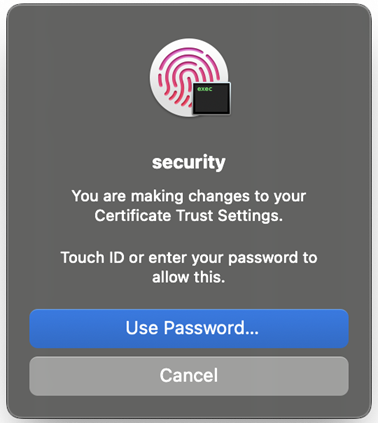
macOS may ask your fingerprint or your password for all
installing certificates.
Use your fingerprint or press Use Password button
and enter the password for your local user
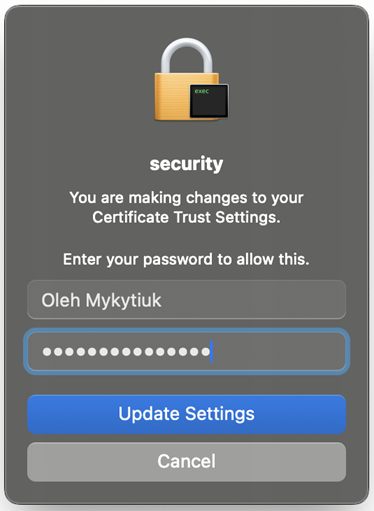
Press Update Settings button to install the Aos Root certificate.
Example output
→ ~ ~/.aos/venv/bin/python3 -m aos_keys install-root
We are going to add two Aos Root certificate as trusted certificates.
The OS will ask your password TWICE to proceed with operation.
→ ~