Delegate Fleets to other organizations
This page outlines the steps to create and manage fleets within AosEdge, and how to assign them to Fleet Owners (FO). A fleet is a collection of units managed together. FO users can operate only within the scope of their assigned fleets.
- Assign Fleet to FO user
- Confirm assigned Fleet as FO user
- Create Unit-set (or validation set) within Fleet
Assign Fleet to FO user
Currently thru AosCloud UI, fleet can be assigned to FO when creating a FO user.
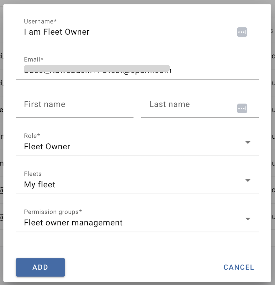
Fleets are assigned to a new Fleet Owner during the FO user creation process in the Users page.
1. As OEM user, go to Users page. Click the "+" button.
2. Input Fleet Owner information.
- Username: Enter the user name to be created. (Cannot have space.)
- Role: Select "Fleet Owner".
- Fleets: Select your target Fleet(s).
- Permission groups: Select "Fleet owner management".
3. Click "ADD" to save.
Confirm assigned Fleet as FO user
FO users can log in and verify assigned fleets and units by checking the Fleets and Units pages, where only relevant data will be visible to them.
1. Login as Fleet Owner.
2. Go to Units. Only Units within the assigned Fleets would be listed.
3. Go to Fleets. Only Fleets assigned to you would be visible.
Create Unit-set within Fleet
FO users can create Unit-set(s) to group and manage the Units within the assigned Fleet.
Unit-set can be configured as a Verification Set for automated update and verification purpose.
See Quick Start > Create Unit-Set and perform the procedures as FO user.