Register a device with AosVM
AosVM is a VirtualBox image that runs two nodes of Ubuntu Linux with AosEdge pre-installed.
Basically, if you have a laptop with Oracle VirtualBox installed and already have your account created, with a simple CLI command, you can download the AosVM and it will automatically complete the provisioning process to have it recognized as a "Unit" in AosEdge.
Once the virtual device (AosVM) is provisioned as a Unit, you can proceed to try installing and running your "Service", a containerized application.
Install required tools
Make sure your machine is installed with the required tools. If you're not sure, check out below links:
Configure AosEdge (Target System)
Login as OEM user.
Open Target Systems page.
Click the "+" icon at the right-top corner.
Input "aos-vm" for Name, "1.0.0" for Version.
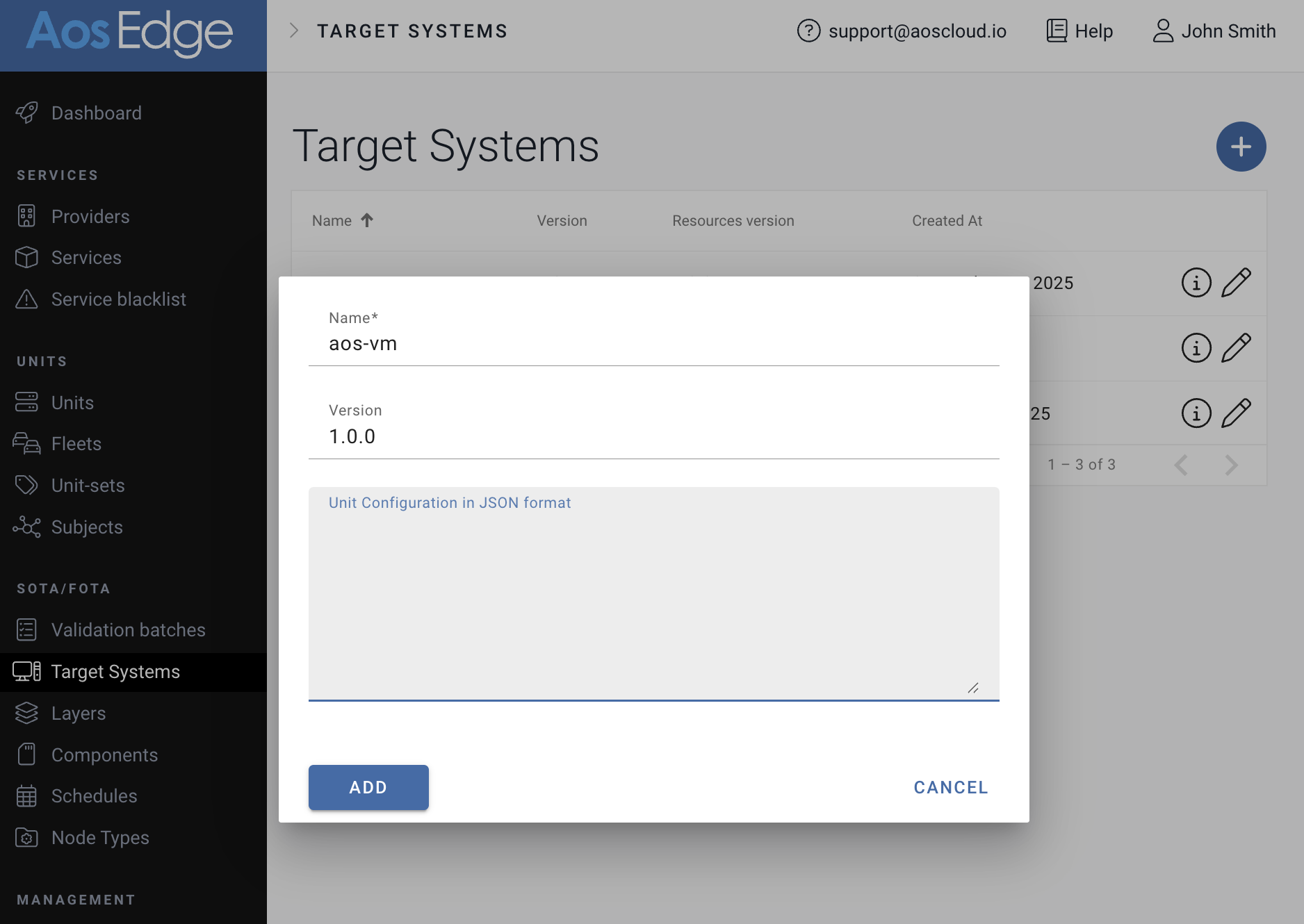
For Unit Configuration, copy-paste the configuration content in https://github.com/aosedge/meta-aos-vm/releases/download/v5.2.0/unitconfig.json.
Click "ADD" to save.
Download AosVM
Aos CLI Tool aos_prov and command download will automatically download the latest AosVM from its public repository.
- Windows
- Linux
~/.aos/venv/Scripts/python -m aos_prov download
~/.aos/venv/bin/python3 -m aos_prov download
Install AosVM
Aos CLI Tool aos_prov and command unit-new --name will install the downloaded AosVM to run on VirtualBox, and also proceed to provision the AosVM nodes as Unit.
Run below command to provision the AosVM as Unit named "FirstUnit".
- Windows
- Linux
~/.aos/venv/Scripts/python -m aos_prov unit-new --name FirstUnit
~/.aos/venv/bin/python3 -m aos_prov unit-new --name FirstUnit
The output will look like below.
(For interested users, noted that the command creates two nodes (node0, node1). Later on, you can use them to experience the multi-node feature of AosEdge.)
aos-prov unit-new --name FirstUnit
aos-prov unit-new --name FirstUnit
Operation will be executed on domain:                                           aoscloud.io
OEM:                                                                            OEM user@epam.com
user:                                                                           oem-user@epam.com
Checking VirtualBox...                                                          7.0.10r158379

Creating a new virtual machines...
Found VM image (v4) with supporting static Nodes functionality. Use it as two nodes VM.
Creating a network for the units...                                             Network aos-network-FirstUnit has been created
Forwarding provisioning port...                                                 8316
Forwarding ssh port to node0...                                                 8143
Forwarding ssh port to node1...                                                 8149
Creating a new VM for node0...                                                  DONE
Creating a new VM for node1...                                                  DONE
Starting VMs in group /AosUnits/FirstUnit
Starting VM f84576ff-3f64-4771-96fc-decc59a496d1...                             DONE
Starting VM 405426f9-bc75-4982-87e1-e228ac9bcf9c...                             DONE
Starting provisioning...
Communicating with unit using provisioning protocol version 5...                Connection timeout
Communicating with unit using provisioning protocol version 5...                Connection timeout
Communicating with unit using provisioning protocol version 5...                Connection timeout
Communicating with unit using provisioning protocol version 5...                DONE
Getting System Info...                                                          DONE
System ID:                                                                      8NNN2OHTJGP5VQ8QH
Unit model:                                                                     vm-dev-multinode;1.0

Getting unit's status on the cloud ...
Getting Node IDs...                                                             ['893fab064d304b2fb56b7e7ecdd7a284']
Wait while secondary node will be connected.
Getting Node IDs...                                                             ['893fab064d304b2fb56b7e7ecdd7a284', '3ff5c179e8f3422da9806deebf506cf1']
Starting provisioning...                                                        DONE
Getting certificate types to renew on node 893fab064d304b2fb56b7e7ecdd7a284...  ['online', 'offline', 'iam', 'sm', 'um', 'cm']
Generating key type: online on Node: 893fab064d304b2fb56b7e7ecdd7a284...        DONE
Generating key type: offline on Node: 893fab064d304b2fb56b7e7ecdd7a284...       DONE
Generating key type: iam on Node: 893fab064d304b2fb56b7e7ecdd7a284...           DONE
Generating key type: sm on Node: 893fab064d304b2fb56b7e7ecdd7a284...            DONE
Generating key type: um on Node: 893fab064d304b2fb56b7e7ecdd7a284...            DONE
Generating key type: cm on Node: 893fab064d304b2fb56b7e7ecdd7a284...            DONE
Starting provisioning...                                                        DONE
Getting certificate types to renew on node 3ff5c179e8f3422da9806deebf506cf1...  ['iam', 'sm', 'um']
Generating key type: iam on Node: 3ff5c179e8f3422da9806deebf506cf1...           DONE
Generating key type: sm on Node: 3ff5c179e8f3422da9806deebf506cf1...            DONE
Generating key type: um on Node: 3ff5c179e8f3422da9806deebf506cf1...            DONE
Registering the unit ...
Applying certificate type: online Node ID: 893fab064d304b2fb56b7e7ecdd7a284...  DONE
Applying certificate type: offline Node ID: 893fab064d304b2fb56b7e7ecdd7a284... DONE
Applying certificate type: iam Node ID: 893fab064d304b2fb56b7e7ecdd7a284...     DONE
Applying certificate type: sm Node ID: 893fab064d304b2fb56b7e7ecdd7a284...      DONE
Applying certificate type: um Node ID: 893fab064d304b2fb56b7e7ecdd7a284...      DONE
Applying certificate type: cm Node ID: 893fab064d304b2fb56b7e7ecdd7a284...      DONE
Applying certificate type: iam Node ID: 3ff5c179e8f3422da9806deebf506cf1...     DONE
Applying certificate type: sm Node ID: 3ff5c179e8f3422da9806deebf506cf1...      DONE
Applying certificate type: um Node ID: 3ff5c179e8f3422da9806deebf506cf1...      DONE
Finishing provisioning...                                                       DONE
Finishing provisioning...                                                       DONE
Finished successfully!
You may find your unit on the cloud here: https://aoscloud.io/oem/units/22296
Confirm AosVM on AosEdge
Use the link at the end of above output or open Units page.
You will find the AosVM provisioned as Unit on AosEdge.
To understand more about managing your Unit, check Monitor your device