Update Unit certificates on your device
Digital certificates play a critical role in ensuring secure communication between the Unit and other systems. They are used to authenticate the Unit’s identity, protect data integrity, and establish encrypted connections.
Over time and depending on your organization policies and platform status, Unit certificates may need to be renewed to maintain trust, comply with security policies, or reflect changes in configuration or ownership.
When to renew certificates
Although certificates have a long validity period—typically 10 years—there are scenarios where manual renewal may be required:
- Security policy updates: Organizational policies may mandate periodic renewal regardless of expiration date.
- System migration: When migrating a unit to a new backend or server infrastructure.
- Credential rotation: To reduce risk in case of potential private key exposure.
- Manual override: If the automatic renewal process was interrupted (e.g., the unit was offline for an extended period).
- Auditing and compliance: To meet regulatory requirements for cryptographic hygiene and lifecycle management.
Unit certificates
Once a Unit is provisioned, the OEM user gains full access to certificate management functions. This includes the ability to view, generate, and renew certificates associated with the Unit.
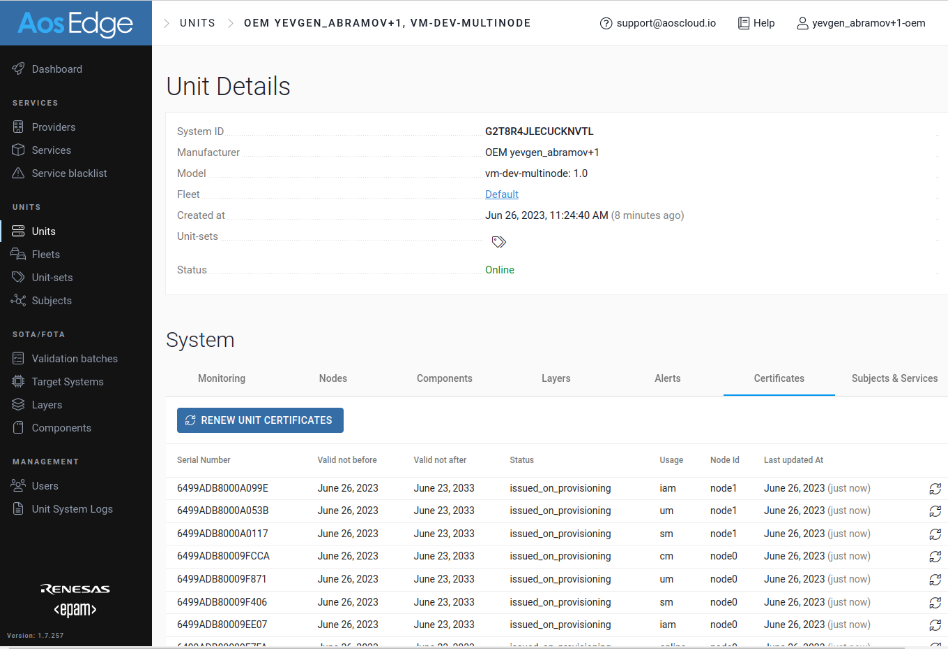
At the Unit Details page, OEM user can view the list of certificates stored on a Unit.
Each certificate information includes key metadata such as issue date, expiration date, and certificate number.
Automatic renewal
By default, each certificate is valid for 10 years. As long as the Unit remains online, certificates are automatically renewed prior to their expiration. This ensures continuous operation without user intervention.
If the Unit is offline, automatic renewal is temporarily paused. Once the device reconnects to the network, AosEdge will automatically update the necessary certificates.
Each renewal will generate a new certificate number, which may be relevant for tracking and audit purposes.
Manual renewal
Unit certificates can be renewed from the certificate list. There are two ways to perform the renewal:
- Bulk renewal: All certificates on the Unit are renewed at once.
- Individual renewal: Specific certificate can be selected and renewed as needed.
Bulk renewal
Press "RENEW UNIT CERTIFICATES" button.
Accept the confirmation popup.
Individual renewal
In the certificate list, find the certificate to be renewed.
Press  of the certificate.
Accept the confirmation popup.